> ## Documentation Index
> Fetch the complete documentation index at: https://docs.rated.network/llms.txt
> Use this file to discover all available pages before exploring further.
# Overview
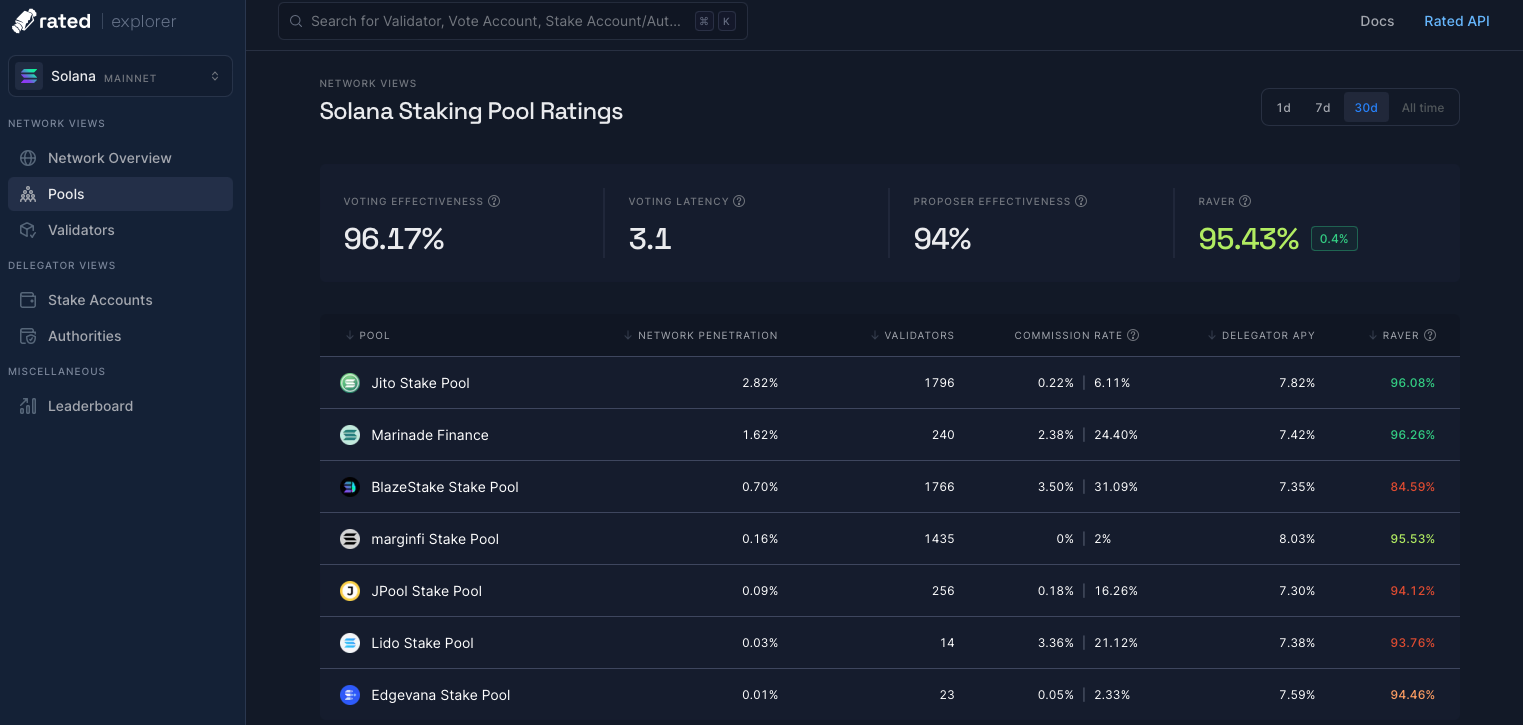
> Definitions of variables that appear in the Pools page on the Rated Explorer for Solana.
**Data freshness**: The views on this page refresh on a daily basis.
On Solana, we have identified staking pools by aggregating [Stake Accounts](/documentation/explorer/solana/network-views/delegators/stake-accounts/stake-accounts) by their [Stake Authorities](/documentation/explorer/solana/network-views/delegators/stake-authorities/stake-authorities) and matching these addresses to pools through different public resources.
 If you are part of an entity that manages a staking pool and would like to self-identify to be part of the pool set on the explorer, head on over to [our forum](https://feedback.rated.network/?b=65a68ac5cbfec0a42d492d9a) or reach out through our [discord](https://bit.ly/ratediscord).
## Counters
There are four counters at the top of the view that show the aggregate performance of the network in the time period selected.
If you are part of an entity that manages a staking pool and would like to self-identify to be part of the pool set on the explorer, head on over to [our forum](https://feedback.rated.network/?b=65a68ac5cbfec0a42d492d9a) or reach out through our [discord](https://bit.ly/ratediscord).
## Counters
There are four counters at the top of the view that show the aggregate performance of the network in the time period selected.
 ## Network Penetration
This is the percentage distribution of stake that maps under any given pool based on their delegated stake to validators. We calculate this as:
$$
Network\ penetration = \frac{delegated\ stake}{total\ network\ stake}
$$
## Validators delegated to
The number of validators this pool has delegated to through the stake accounts it controls.
## Commission Rate
This is the stake-weighted commission rate being charged to this pool based on the validators this pool has delegated its stake to. On the left is the commission rate for voting/staking rewards and on the right is the commission rate for MEV rewards.
## Delegator APY
The annual percentage yield earned by this pool. On the `1d` time period, the APY takes into account the rewards received for the last 3 days to smooth out the noise given Solana's staking rewards schedule, which is every epoch (\~2 days). For more information, please refer to our documentation [Annual Percentage Yield (APY)](/documentation/methodologies/solana/annual-percentage-yield-apy)
## Blended Effectiveness
This is the effectiveness rating of a pool based on the stake-weighted effectiveness of the validators they have delegated to.
## Network Penetration
This is the percentage distribution of stake that maps under any given pool based on their delegated stake to validators. We calculate this as:
$$
Network\ penetration = \frac{delegated\ stake}{total\ network\ stake}
$$
## Validators delegated to
The number of validators this pool has delegated to through the stake accounts it controls.
## Commission Rate
This is the stake-weighted commission rate being charged to this pool based on the validators this pool has delegated its stake to. On the left is the commission rate for voting/staking rewards and on the right is the commission rate for MEV rewards.
## Delegator APY
The annual percentage yield earned by this pool. On the `1d` time period, the APY takes into account the rewards received for the last 3 days to smooth out the noise given Solana's staking rewards schedule, which is every epoch (\~2 days). For more information, please refer to our documentation [Annual Percentage Yield (APY)](/documentation/methodologies/solana/annual-percentage-yield-apy)
## Blended Effectiveness
This is the effectiveness rating of a pool based on the stake-weighted effectiveness of the validators they have delegated to.